Thursday, March 14, 2013

Index Keys & Properties as a step in Database Tuning

Introduction


As DBA's, we encounter long running queries that end-users compalin about. Indexing strategy is one area of database where developers usually tend to create indexes on the fly without much consideration for or analysis on how an index that helps one query marginally can slow down a bunch of other queries or stored procedures drastically. Some (not  all) of the situations that we usually come across are following:


  • Dbo.Orders table is being joined to dbo.Order_Details table but both of them exist on the same filegroup and on the same set of underlying discs. This would cause disc queuing and the consequent slowness. 
  • Dbo.Orders table is being joined to dbo.Order_Details table on the common column Product_ID but Product_ID is the leftmost colmn of a non-clustered index on dbo.Orders but is the third column in another non-clustered index on dbo.Order_Details. So these indexes don't help this join much. 
  • Updates are taking place on a column that has a non-clustered index that is compressed. It would be good not to have an index at all on a column being updated. In case such an index is really required, not compressing it would be beneficial. Otherwise the update is much slower than when the index is uncompressed.
  • A majority of values in a particular column used in the WHERE clause of a query have a value but the query is designed to fetch only such rows where the value is null. May be a filtered-index would have helped speed it up.  
In such situations and some others, we would like to have a quick gance at atleast the following to begin with:
  • Whether the two tables being joined are physically resident on different filegroups.
  • The columns being joined are the leftmost columns in their respective indexes.
  • The column being updated is not part of an index (first of all) that is compressed in any way (definitely not).
  • In case, a query is looking for a small subset of values from a column, is the column a part of an index that has the appropriate filter defined on the index.
  • Etc.
 Instead of trying to procure such relevant information painstakingly one at a time, an easier way would be to have a stored procedure return the same. This article is aimed at creating such a stored procedure that could come in handy in performance situations described above.

Details of the Stored procedure
The text of the store procedure is given below:

If exists (select 1 from sys.procedures              
               where USER_NAME(schema_id) = 'dbo'
               and name = 'dbp_Find_Index_Properties_by_Column'
               and type = 'P')
begin
     drop procedure dbo.dbp_Find_Index_Properties_by_Column
end
go
create procedure dbo.dbp_Find_Index_Properties_by_Column
  @i_Table_Name     varchar(64) = null
,@i_Column_Name varchar(24) = null
,@l_Column_Position_in_Index tinyint = null
as
*******************************************************************************************************************************
Created by: Suresh K Maganti
Purpose    : Find if a column is used in an index. View additional properties of the index.
                   For now, I have included only clustered and non-clustered indexes.
Input
Parameters: If provided, the result set is appropriately filtered. Else, the complete result set is returned.
********************************************************************************************************************************/
set  nocount on;

with CTE_Base (Table_Name, Index_Name, Leftmost_Column_in_Index, Position_in_Index, Columns_in_the_Index, Index_Type, Is_Primary_Key, Is_The_Index_Unique, Fill_Factor_When_Created, File_Group_Name, Is_It_A_Filtered_Index, Filter_Definition, Is_An_Included_Column, Is_Compressed, Type_Of_Compression_Used)
as
(    select C.Name Table_Name, b.name Index_Name
,col_name(b.[object_id], (select e.column_id from sys.index_columns  e
                                          where e.index_column_id = 1
                                          and     e.[object_id] = b.[object_id]
                                          and     e.index_id = b.index_id))                   Leftmost_Column
,case
    when @i_Column_Name is null then null
    else a.key_ordinal
end                                                                                                         Position_in_Index

,replace((select col_name(f.[object_id], f.column_id) + ' ###' 'data()'
               from sys.index_columns f
               where f.[object_id] = a.[object_id]
               and     f.index_id = a.index_id
               order by f.key_ordinal asc
               for XML Path ('')), '###', ',')                                                   Columns_in_the_Index

,case b.Type
      when 0 then 'Heap'
      when 1 then 'Clustered'
      when 2 then 'Nonclustered'
      when 3 then 'XML'
      when 4 then 'Spatial'
end                                                                                                         Index_Type

      ,case b.is_primary_key
       when 1 then 'Yes'
       else 'No'
end                                                                                                         Is_Primary_Key


,case b.is_unique
       when  1 then 'Yes'
       else 'No'
end                                                                                                        Is_The_Index_Unique

,b.fill_factor                                                                                          Fill_Factor_When_Created

,FILEGROUP_NAME (b.data_space_id)                                            File_Group_Name

,case b.has_filter
     when 1 then 'Yes'
     else 'No'
end                                                                                                        Is_It_A_Filtered_Index
    
,b.filter_definition

,case a.is_included_column
      when 1 then 'Yes'
      else 'No'
end                                                                                                        Is_An_Included_Column

,case
     when d.data_compression > 0 then 'Yes'
     else 'No'
end                                                                                                       Is_Compressed

,d.data_compression_desc Type_Of_Compression_Used

from                   sys.tables c left join sys.index_columns a

on c.[object_id] = a.[object_id]

inner join sys.indexes b

on    a.[object_id] = b.[object_id]
and  a.index_id = b.index_id

inner join sys.partitions d
on     b.[object_id] = d.[object_id]
and   b.index_id = d.index_id

where b.[type] in (1, 2)
and a.key_ordinal = isnull(@l_Column_Position_in_Index, a.key_ordinal)
and OBJECTPROPERTY (b.[object_id], 'IsSystemTable') = 0
and OBJECTPROPERTY (b.[object_id], 'IsTable') = 1
and col_name(b.[object_id], a.column_id) = ISNULL(@i_Column_Name, col_name(b.[object_id], a.column_id))
and c.name = ISNULL(@i_Table_Name, c.name))


select distinct Table_Name, Index_Name, Leftmost_Column_in_Index, Position_in_Index
,substring(Columns_in_the_Index, 1, LEN(Columns_in_the_Index) - 1) Columns_in_the_Index
,Index_Type, Is_The_Index_Unique, Fill_Factor_When_Created, File_Group_Name, Is_It_A_Filtered_Index, Filter_Definition, Is_An_Included_Column, Is_Compressed, Type_Of_Compression_Used

from CTE_Base
order by Table_Name

set nocount off;

go

For now, I have included only clustered and non-clustered index including filtered indexes.
This stored procedure basically uses a few catalogue views:

  • sys.partitions
  • sys.tables
  • sys.index_columns
  • sys.indexes

and a few system functions like:
  • OBJECTPROPERTY
  • FILEGROUP_NAME
  • COL_NAME
and a new construct FOR XML PATH that was introduced in Microsoft SQL Server 2008. XML PATH is being used in this stored procedure to generate a comma separated list of columns that are part of a given index ordered by their order of occurrence within the index. You may notice an interesting fact here. I am using ORDER BY inside the subquery. Normally ORDER BY is the last part of any SELECT statement. But when used with XML PATH, it comes before the FOR XML PATH construct. Another thing you may notice is that when ORDER BY is used inside a subquery, usage of TOP 100 PERCENT after the keyword SELECT, is mandatory in most cases. Not so in this case.

The rest are all basic joins.

Now we will get to the usage of this stored procedure.


Usage
For simplicity, I have used Microsoft's Adventureworks database in the examples below.

Execution 1:


Please execute the following TSQL code without any input parameters:

execute dbo.dbp_Find_Index_Properties_by_Column


                                                                                   Figure 1

Results for all clustered and non-clustered indexes in the Adventureworks database are displayed.


Execution 2:


Please execute the following TSQL code. It will display the results for all tables and their indexes in the Adventureworks database the column AddressID is a part of:

execute dbo.dbp_Find_Index_Properties_by_Column null, 'AddressID', null

                                                                                 Figure 2

Execution 3:

Now execute the following TSQL statements to change the fillfactor on the index Purchasing.VendorAddress.IX_VendorAddress_AddressID from 80 to 50:

use Adventureworks
go
alter index IX_VendorAddress_AddressID on Purchasing.VendorAddress rebuild with (statistics_norecompute = on, fillfactor = 50, Online = ON, maxdop = 8, sort_in_tempdb = on, allow_page_locks = on)
go

Now execute the statement below to see if the change in fill factor for this index has been captured:

execute dbo.dbp_Find_Index_Properties_by_Column null, 'AddressID', null

                                                                             Figure 3


As you have noticed in the screenshot above, the stored procedure displays 50 (Figure 3) intead of 80 (Figure 2) for the fill factor for this index.


Execution 4: 

 Now let us add a secondary filegroup named SecondaryFileGroup to the database Adventureworks, add a data file to this new filegroup, then drop the index Purchasing.VendorAddress.IX_VendorAddress_AddressID and finally recreate it on the new filegroup, SecondaryFileGroup using data compression and a filter on the AddressID column. The same is accomplished by executing the following code. Please note that you may have to change the path of the new data file in the code below as per you custom configured disc layout:
 

alter database Adventureworks add filegroup SecondaryFileGroup
go
alter database Adventureworks add file (Name = Adventureworks_2, filename = 'E:\Data3\MSSQL\Data\Adventureworks_2.ndf', size = 10MB, Maxsize = 100MB, filegrowth = 10%) to filegroup SecondaryFileGroup
go
drop index Purchasing.VendorAddress.IX_VendorAddress_AddressID
go
create index IX_VendorAddress_AddressID on Purchasing.VendorAddress (AddressID)
where AddressID is not null with
(statistics_norecompute = on, fillfactor = 50, data_compression = Page, Online = ON, maxdop = 8, sort_in_tempdb = on, allow_page_locks = on) on SecondaryFileGroup
go
 Now execute the statement below to see if the changes for this index have been captured:

execute dbo.dbp_Find_Index_Properties_by_Column null, 'AddressID', null


                                                                                 Figure 4

The changes have been captured.

Execution 5:

Lets check to see on which tables the column, AddressID is being used in an index while occurring at the second position.

Please execute the statement below to find this out:

execute dbo.dbp_Find_Index_Properties_by_Column null, 'AddressID', 2


                                                                                           Figure 5

AddressID occurs as the second column in the three indexes on the three tables shown in Figure 5 above. 

Summary:
The stored procedure dbo.dbp_Find_Index_Properties_by_Column can be used to find various aspects of how a column is involved within an index. This SP also provides details on various indexes which can then be used to refine existing indexing strategy based on various application stored procedures. I haven't delved deeper into performance optimization with respect to indexing strategy in this article. I have only attempted to provide an easier starting piont for a preliminary analysis.

As usual, please let me know of your thoughts and comments.

Friday, November 18, 2011

Usage of CTE - Trick with Dates

Situations arise where logical data generation becomes a requirement. By 'Logical Data Generation', I mean generating additional data based on a logic being applied to existing data. Of course, there are multiple ways of doing the same. In this article, I would like to demonstrate how it conventionally being done using cursors and how it can be done much more efficiently using CTE's. The concept is being brought out using a simple example.

The problem:
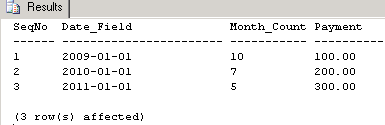
In order to explain the problem, let me first create two tables, dbo.abc and dbo.def. Once we get familiarity with the data, it would be easier to explain the problem. The table dbo.abc has four columns namely, SeqNo, Date_Field, Month_Count, and Payment. Lets create and populate it by executing the code below:

if exists (select * from sys.tables
           where name = 'abc'
           and   USER_NAME(schema_id) = 'dbo'
           and   [type] = 'U')
drop table dbo.abc 
go

create table dbo.abc
(SeqNo smallint
,Date_Field datetime
,Month_Count tinyint
,Payment decimal(10,2))
go
insert into dbo.abc (SeqNo, Date_Field, Month_Count, Payment)
values (1, '20090101', 10, 100)
          ,(2, '20100101', 7, 200)
          ,(3, '20110101', 5, 300)
go
Lets create another table dbo.DEF with the columns SeqNo, Date_Field, and Payment only. We will keep it empty for now.

if exists (select * from sys.tables
           where name = 'def'
           and   USER_NAME(schema_id) = 'dbo'
           and   [type] = 'U')
drop table dbo.def
go

create table dbo.def
(SeqNo smallint
,Date_Field datetime
,Payment decimal(10,2))
go
Please execute the code below to view the data in the table, dbo.abc:

select * from abc

go
The lets define the problem. Each row in the table, dbo.abc has to be duplicated as many times as the value of Month_Count in that row. Currently the Date_Field has a value that represents the first day of an year. While duplicating the data, we need to ensure that each new row has its Date_Field value incremented by one month. We need to stop the duplication as soon as we reach the month value in the column Month_Count for that row.  The values for the columns SeqNo and Payment should remain as they are in the original row. This process needs to be done for all rows in the table, dbo.abc. Finally we need to display all the original and duplicated rows.

Now let us write a conventional SQL Server 2000 type program. Since I have to loop through the data in each row, I am ending up using a CURSOR and a WHILE loop. The T-SQL program is given below:


declare @l_SeqNo int
           ,@l_date_field datetime
           ,@l_Month_Count smallint
           ,@l_Payment decimal(10, 2)
           ,@l_counter smallint

select @l_counter = 0
set nocount on;
declare i_Cursor insensitive cursor
for
select SeqNo, Date_Field, Month_Count, Payment from dbo.abc

open i_Cursor

fetch next from i_Cursor into
                             @l_SeqNo
                            ,@l_date_field
                            ,@l_Month_Count
                            ,@l_Payment

while @@fetch_status = 0
begin
      select @l_counter = 0

      while (@l_counter < @l_Month_Count)
      begin
            insert into dbo.def (SeqNo, Date_Field, Payment)
            select @l_SeqNo, dateadd(mm, @l_counter, @l_date_field), @l_Payment

            select @l_counter = @l_counter + 1
      end

      fetch next from i_Cursor into
                                   @l_SeqNo
                                  ,@l_date_field
                                  ,@l_Month_Count
                                  ,@l_Payment
end
close i_Cursor
deallocate i_Cursor
set nocount off;
go

After executing the above program, let us check the table dbo.DEF:
select * from def


It may be noted in the result set above that the row with SeqNo 1 has been duplicated 10 times, 10 being the value of the Month_Count field in table dbo.abc. Similarly, the row with SeqNo 2 has been duplicated 7 times, 7 being the value of the Month_Count field in table dbo.abc.  Finally the row with SeqNo 3 in the table dbo.abc has been duplicated 5 times, 5 being the value of the Month_Count field in table dbo.abc. We have kept the values of SeqNo and Payment columns intact through this duplication exercise.


The problem has been solved. Now let us solve the same problem in a different way using Recursive CTE in SQL Server 2005/2008 style of coding. The code is given below. please execute the same:

with CTE_Base (SeqNo, Date_Field, Month_Count, Payment, Begin_Date, End_Date, Frequency)
as
(select SeqNo, Date_Field, Month_Count, Payment, Date_Field, dateadd(mm, Month_Count-1, Date_Field), 1 from abc)
,CTE_Level1 (SeqNo, Date_Field, Month_Count, Payment, Begin_Date, End_Date, Frequency)
as
(select SeqNo, Date_Field, Month_Count, Payment, Begin_Date, End_Date, Frequency from CTE_Base
union all
select SeqNo, dateadd(mm, Frequency, Date_Field), Month_Count, Payment, Begin_Date, End_Date, Frequency
from CTE_Level1
where dateadd(mm, Frequency, Date_Field) between Begin_Date and End_Date)

select SeqNo, Date_Field, Payment
from CTE_Level1
where Date_Field between Begin_Date and End_Date
order by SeqNo, Date_Field
go

Here is the result set:


If we set "Show Actual Execution Plan" and then run both the queries (the cursor based one and the recursive CTE based one), you will note that the query cost of the conventional cursor based approach to this problem's solution is 94% where as it is 6% with the recursive CTE based solution.

It may also be noted that in the recursive CTE not a single variable has been used unlike the cursor based methodology.

The problem I have used in this article is just to solve a situation where new data is to be generated based on applying certain logic on existing data. In practice, there are and would be many more such situations where recursive CTE's can be put to good use for efficieny in execution and brevity of code.

Thursday, August 25, 2011

Using Recursive CTE to Minimize Table Scans

Company XYZ WORKS has four vendors.  Each vendor is paid based on goods supplied by them to XYZ WORKS. Based on the payment history, the company wants to know the least non-zero amount that was paid to each vendor. If a vendor wasn't ever paid any amount, then that vendor should also fall in ths list. It is this extra requirement that adds a little complication to the task. Lets solve the problem now.

First, we would create a table called dbo.Payment_Details as following:

if exists (select 1 from sys.tables
           where Schema_NAME(schema_ID) = 'dbo'
           and   name = 'Payment_Details')
begin
   drop table dbo.Payment_Details
end;


create table dbo.Payment_Details
(Name                varchar(10)
,Amount             int
,Payment_Date  smalldatetime)
 

Next, lets populate this table with relevant data:

insert into dbo.Payment_Details
values ('Veronica', '0', '20110201')
      ,('Veronica', '10', '20110301')
      ,('Veronica', '20', '20110401')
      ,('Veronica', '30', '20110501')
      ,('Tiffany', '40', '20110201')
      ,('Tiffany', '50', '20110301')
      ,('Tiffany', '60', '20110401')
      ,('John', '0', '20110201')
      ,('John', '70', '20110301')
      ,('John', '80', '20110401')
      ,('Anthony', '0', '20110201')
 

Lets see the contents of the table, dbo.Payment_Details:

select * from Payment_Details;


What we expect in the final solution is following:

Name             Amount
------------      ------------
Anthony         0
John               70
Tiffany           40
Veronica        10


Lets code some solutions:

Variation 1:

In this solution, we are using CTE but not recursively. In other words, a CTE does not reference itself. In this solution, the table, dbo.Payment_Details is being referenced twice, once per CTE.

with CTE_1 (Name, Amount)
as (select Name, min(Amount)
     from dbo.Payment_Details with (nolock)
     where Amount > 0
     group by Name)
,CTE_2 (Name, Amount)
as (select b.Name, b.Amount from dbo.Payment_Details b with (nolock)
     where b.Name not in (select Name from CTE_1)
     and b.Amount = 0
     union all
     select Name, Amount from CTE_1)

select * from CTE_2;


Variation 2:

In this solution, we are again using CTE but not recursively. In this solution, the table, dbo.Payment_Details is being referenced twice, both times in the first CTE.

with CTE_1 (Name, Amount, RowNumber)
as (select Name, Amount, row_number() over(Partition by Name order by Name, Amount) RowNumber
    from dbo.Payment_Details with (nolock)
    where Amount = 0
    union
    select Name, Amount, row_number() over(Partition by Name order by Name, Amount desc) RowNumber
    from dbo.Payment_Details with (nolock)
    where Amount > 0)
,CTE_2 (Name, Amount, RowNumber)
as (select Name, Amount, row_number() over(partition by Name order by Name, RowNumber desc) RowNumber
     from CTE_1)

select Name, Amount from CTE_2
where RowNumber = 1;


Variation 3:

In this solution, we are again using CTE but recursively. In other words, a CTE is referencing itself within itself. In this solution, the table, dbo.Payment_Details is being referenced only once.

with CTE_1 (Name, Amount, RowNumber)
as (select distinct Name, Amount, row_number() over(Partition by Name order by Name, Amount) RowNumber
     from (select Name, Amount from dbo.Payment_Details with (nolock)) a
     union ALL
     select Name, Amount, row_number() over(Partition by Name order by Name, RowNumber desc) RowNumber
     from CTE_1
     where RowNumber = 2)

,CTE_2 (Name, Min_Amt, Max_Amt, RowNumber)
as (select distinct Name, min(Amount) over(partition by Name, RowNumber) Min_Amt, MAX(Amount) over(partition   by Name, RowNumber) Max_Amt, RowNumber
     from CTE_1
     where RowNumber = 1)

SELECT Name, case
                              when Min_Amt = 0 then Max_Amt
                              else Min_Amt
                            end Amount
FROM CTE_2;


In this article, we have shown that Recursive CTE could be used effectively to reduce the number of Scans of the referenced table.

Calculating Cumulative percentages with CTE

A company sells different products on the internet. For the sake of this example, lets say it sells bicycles, scooters and lawn mowers. Everyday, customers order different quantities of these three products. The company's capacity is to ship upto 25% of pending orders by sale amount of each product everyday. And the company wants to meet its capacity every weekday while making sure that customers are being served as per their order date starting with the earliest
pending order for a given product. For example, if there are pending orders worth $1000 for bicycles today, bicycles worth upto $250 should be shipped today in the order in which orders were placed by the customers. At the same time, orders should be shipped in full and not partially.

I am using just one table for this demo. It is not in the third normal form just to make the explanation simple. So lets create a base table with the relevant sample data. Please note that the code below is compatible with microsoft SQL Server 2008. With slight modifications, it can work in Microsoft SQL Server 2005 as well :

if exists (select * from sys.tables
           where Schema_NAME(schema_ID) = 'dbo'
           and   name = 'Order_details')
begin
   drop table dbo.Order_details
end;

create table dbo.Order_details
(Order_ID                     int identity(1, 1) primary key clustered with (fillfactor = 50, data_compression = page)
,Order_Date                  smalldatetime not null
,Product_Name             varchar(50) not null
,Unit_Price                    decimal(28,2) not null
,Quantity_Ordered         smallint not null
,Order_Value                 as (Quantity_Ordered * Unit_Price)
,Order_Value_As_Percent_of_Pending_Orders_By_Product  decimal(28, 10) null
,CutOff_Value_By_Product                                                     decimal(28, 10) null
,Ship_It_Today              bit not null default (0)
,Shipping_Date              smalldatetime null)


Next, let us populate the table, dbo.Order_Details.

insert into dbo.Order_details (Order_Date, Product_Name, Unit_Price, Quantity_Ordered)
--10 orders for bicycles
 values (GETDATE()-10 , 'Bicycle', 100.00, 1)
,(GETDATE()-9 , 'Bicycle', 100.00, 2)
,(GETDATE()-8 , 'Bicycle', 100.00, 3)
,(GETDATE()-7 , 'Bicycle', 100.00, 4)
,(GETDATE()-6 , 'Bicycle', 100.00, 5)
,(GETDATE()-5 , 'Bicycle', 100.00, 6)
,(GETDATE()-4 , 'Bicycle', 100.00, 7)
,(GETDATE()-3 , 'Bicycle', 100.00, 8)
,(GETDATE(), 'Bicycle', 100.00, 2)
,(GETDATE(), 'Bicycle', 100.00, 10)
--10 orders for scooters
,(GETDATE()-10 , 'Scooter', 300.00, 5)
,(GETDATE()-9 , 'Scooter', 300.00, 2)
,(GETDATE()-8 , 'Scooter', 300.00, 4)
,(GETDATE()-7 , 'Scooter', 300.00, 1)
,(GETDATE()-6 , 'Scooter', 300.00, 6)
,(GETDATE()-5 , 'Scooter', 300.00, 9)
,(GETDATE()-4 , 'Scooter', 300.00, 10)
,(GETDATE()-3 , 'Scooter', 300.00, 2)
,(GETDATE(), 'Scooter', 300.00, 15)
,(GETDATE(), 'Scooter', 300.00, 13)
--10 orders for lawn mowers
,(GETDATE()-10 , 'Lawn Mower', 500.00, 1)
,(GETDATE()-9 , 'Lawn Mower', 500.00, 2)
,(GETDATE()-8 , 'Lawn Mower', 500.00, 1)
,(GETDATE()-7 , 'Lawn Mower', 500.00, 2)
,(GETDATE()-6 , 'Lawn Mower', 500.00, 1)
,(GETDATE()-5 , 'Lawn Mower', 500.00, 2)
,(GETDATE()-4 , 'Lawn Mower', 500.00, 1)
,(GETDATE()-3 , 'Lawn Mower', 500.00, 1)
,(GETDATE(), 'Lawn Mower', 500.00, 5)
,(GETDATE(), 'Lawn Mower', 500.00, 3)

Lets read the contents of the table dbo.Order_Details:

select * from dbo.Order_details;

Our purpose is to mark the orders to be shipped today based on upto 25% of the pending order value for each product. This is accomplished by the code below:

With CTE_Base (Order_ID, Order_Date, Product_Name, Order_Value, RowNumber, Total_Value_of_Pending_Orders_By_Product, Order_Value_As_Percent_of_Pending_Orders_By_Product)
as
    (select Order_ID

              ,Order_Date
              ,Product_Name
              ,Order_Value
              ,ROW_NUMBER () over(partition by Product_Name order by Product_Name, Order_Date) RowNumber
              ,SUM(Order_Value) over(partition by Product_Name) Total_Value_of_Pending_Orders_By_Product
              ,convert(decimal(28, 15), convert(decimal(28, 15), Order_Value) / convert(decimal(28, 15), SUM(Order_Value) over(partition by Product_Name))) Order_Value_As_Percent_of_Pending_Orders_By_Product
     from dbo.Order_details with (nolock)
     where Ship_It_Today = 0)
    
--select * from CTE_Base


,CTE_Level1 (Product_Name, RowNumber, CutOff_Value_By_Product)
as
    (select a.Product_Name

               ,a.RowNumber
               ,(select SUM(b.Order_Value) from CTE_Base b
                 where b.Product_Name = a.Product_Name
                 and   b.RowNumber <= a.RowNumber)  /  a.Total_Value_of_Pending_Orders_By_Product
     from CTE_Base a)


--select * from CTE_Level1

update a
set a.Order_Value_As_Percent_of_Pending_Orders_By_Product = b.Order_Value_As_Percent_of_Pending_Orders_By_Product
   ,a.CutOff_Value_By_Product  = c.CutOff_Value_By_Product
   ,a.Ship_It_Today                      = case
                                                              when c.CutOff_Value_By_Product <= 0.26 then 1
                                                              else a.Ship_It_Today
                                                         end
   ,a.Shipping_Date                      = case
                                                              when c.CutOff_Value_By_Product <= 0.26 then GETDATE()
                                                              else null
                                                        end                                                          
from dbo.Order_details a
inner join CTE_Base b
on a.Order_ID = b.Order_ID
inner join CTE_Level1 c
on  b.Product_Name = c.Product_Name
and b.RowNumber    = c.RowNumber
where a.Ship_It_Today = 0
and a.Shipping_Date is null;


Now lets see the orders that need to be shipped today. It may be noted that we have shipped upto 25% of the orders by value for each product today:

select * from dbo.Order_details;


Table_Sizes

Introduction:

Designing databases is a common activity for most of us. Assigning proper datatypes to attributes within entities is a part of that. Once promoted to production when thousands of users pound these tables, the DBA usually keeps track of the growth trends of databases and tables within them. For a DBA, maintaining these statistics (apart from numerous others) is important to see how the application is doing, how the
user-response is varying and how the hardware is being utilized.

When an application slows down and the database response is poorer, there could be several contributing factors like bad database layout, sub-optimal database design, ill-designed application (no SP's/adhoc TSQL), ill-written stored procedures, improper allocation of CPU/memory, and a few more and several
combinations of them. A common problem that I as a DBA came across is inapropriate dataypes for fields during design phase but detected a few months after implementation. This is so rampant especially when a DBA is not part of the design or is hired after the fact. I would like to share one such case with you today.

Building up a scenario:

The first step for me is to get a list of a few of the largest tables (in terms of row counts) in a database. Then I need to get the size of these individual tables (on disc) as well. Having done that, I can figure out the largest tables in terms of rowcount and size on disc.

I would also like to see how many rows (on an average) reside on each data page allocated to the table. Let us call it "row density" for our discussion.

To get this data, I used to use different methods in Microsoft SQL Server 2000 and 2005. However in SQL Server 2008, I use the undocumented system function, sys.fn_PhysLocFormatter and the system stored procedure sp_MSForEachTable. I use them for a quick view of the database tables for my own benefit rather than to send a report to the CTO as these objects are unsupported.


select sys.fn_PhysLocFormatter (%%physloc%%) Rows_per_Page from Orders

The results look like the following:


Rows_per_Page
-------------------------
(1:90536:0)
(1:90536:1)
(1:90536:2)

Each row in the result set represents one row in Orders table. So there would be as many rows in this result set as there are rows in the table, Orders.

Let's describe the three portions in the result above: 1:90536:0. First portion, 1 is the id of the data file on which the page (90536) containing this row (first row = Row 0) exists. You may observe that rows numbered 1 and 2 in the result set above also reside on the same page, 90536. Please note the first row
contained in a page is the 0th row in the result set above as the counting starts from 0 onwards instead of from 1. In effect, there are 3 rows in the page 90536 for this table. So our row_density is 3.0.

Most of us are very familiar with the system stored procedure, sp_msforeachtable. It performs the same set of prescribed activities on all tables in a given database. As it has been discussed so often on the forums, I would skip its description here.

Now let's customize the usage of sys.fn_PhysLocFormatter and sp_msforeachtable for each table so that we can obtain more user-friendly results for analysis and action:


/*******************************
NAME : Table Size script.
Author : Suresh K Maganti
Purpose: Get Pages, pages per row, Table size for each table. Find large tables with low row-density.
********************************/
if OBJECT_ID('tempdb..#TEMP') is not null
drop table #TEMP

create table #TEMP (Table_Name varchar(100) null
,Pages int null
,Rows_Per_Page decimal(28,4) null
,Rows_in_Table as convert(decimal(28, 0), Pages * Rows_Per_Page)
,Table_Size_MB as convert(decimal(28, 0), (convert(decimal(28,2), Pages) * 8192.00) / (1024.00 * 1024.00)))


insert into #TEMP (Table_Name, Pages, Rows_Per_Page)
exec sp_msforeachtable 'select ''?'', count (Page_Number) Numer_of_Pages_in_Table, isnull(Avg (isnull(convert(decimal(28, 4), Rows_Per_Page), 0.0000)), 0.0000) Avg_Rows_Per_Page
from
(select substring(SUBSTRING(File_Page_Row, CHARINDEX('':'', File_Page_Row, 1) + 1, 100), 1, charindex('':'', SUBSTRING(File_Page_Row, CHARINDEX('':'', File_Page_Row, 1) + 1, 100), 1)-1) Page_Number, COUNT(1) Rows_Per_Page
from
(select sys.fn_PhysLocFormatter (%%physloc%%) File_Page_Row from ?) a
group by substring(SUBSTRING(File_Page_Row, CHARINDEX('':'', File_Page_Row, 1) + 1, 100), 1, charindex('':'', SUBSTRING(File_Page_Row, CHARINDEX('':'', File_Page_Row, 1) + 1, 100), 1)-1)) b'


select * from #TEMP
order by 2 desc, 3 asc

if OBJECT_ID('tempdb..#TEMP') is not null
drop table #TEMP


Here is the result set:

Table_Name Pages Rows_Per_Page Rows_in_Table Table_Size_MB
----------------------------------- --------------- ------------------------ ----------------------- ----------------------
[dbo].[Order_Details] 100021 35.0380 3511193 783
[dbo].[Order_Master] 3345 83.1629 278180 26
[dbo].[Customer_Details] 2376 526.0118 1249804 19
[dbo].[Customer_Master] 358 404.1006 144668 3
...


I have shown the partial result set above for our explanation.

From past designs and analyses, I generally mark tables with under 100 rows/page as problematic. I always try to find ways to bring this figure to 100 rows/page or more in consultaion with the application development teams. Sometimes it requires further normalization as well. In our example, Order_Details
table is our largest (~3.5 million rows) occupying ~783 MB of disc space. However, the row density is just around ~35. If we could increase the row density somehow, we could auotmatically bring down the table size on disc.

Let's see the table structure now:

Sp_help [Order_Details]

Column_name Type Computed Length Prec Scale Nullable

--------------------- ------------ ---------------- -------------- ---------- ----------- -----------------
Order_ID int no 4 10 0 no
Product_ID int no 4 10 0 no
Specifications nvarchar no 400 yes
Status varchar no 255 yes


Observations and verifications:

The column, [Specifications] has the datatype nvarchar(400). In our case, we do not store unicode values in this column as per the application team.
There is a composite clustered index on the columns (Order_ID, Product_ID) with fillfactor = 100.
There is no compression on this table or its index.
This is a pretty normalized table with just 4 columns.
This table is not partitioned.
Recommendations:

If we could change the dataype for the column, [Specifications] to varchar(400), we could reduce the storage space.
If we could compress the lone index and the table data, we could reduce the table size further.
 

Evaluation of recommendations:
Let us estimate our gains through page compression:

sp_estimate_data_compression_savings @schema_name = 'dbo', @object_name = 'Order_Details', @index_id = 1, @partition_number = 1, @data_compression = 'Page'

Here is the result:
object_name schema_name index_id partition_number size_with_current_compression_setting(KB) size_with_requested_compression_setting(KB)
Order_Details dbo 1 1 983688 758784


That's almost a gain of 23% space. Let us estimate our gains through row compression:

sp_estimate_data_compression_savings @schema_name = 'dbo', @object_name = 'Order_Details', @index_id = 1, @partition_number = 1, @data_compression = 'Page'

Here is the result:
object_name schema_name index_id partition_number size_with_current_compression_setting(KB) size_with_requested_compression_setting(KB)
Order_Details dbo 1 1 983688 969192

With row compression, our gain is around 1.5% only. So we could definitely benefit from Page compression in this case.


Implementation:
So here we go with the implementation:

--Change the datatype from nvarchar(400) to varchar(400)
alter table [dbo].[Order_Details] alter column [Specifications] varchar(400) null

--Compress the clustered index using PAGE compression:
alter index all on [dbo].[Order_Details] rebuild with (fillfactor = 95, Data_Compression = PAGE, maxdop = 1)

--Compress the table using PAGE compression (Not necessary if the above step is done):
alter table [dbo].[Order_Details] rebuild Partition = All with (Data_Compression = PAGE, maxdop = 1)


Testing:

Now let's run our script again to see the row density and table sizes:

/*******************************
NAME : Table Size script.
Author : Suresh K Maganti
Purpose: Get Pages, pages per row, Table size for each table. Find large tables with low row-density.
********************************/
if OBJECT_ID('tempdb..#TEMP') is not null
drop table #TEMP

create table #TEMP (Table_Name varchar(100) null
,Pages int null
,Rows_Per_Page decimal(28,4) null
,Rows_in_Table as convert(decimal(28, 0), Pages * Rows_Per_Page)
,Table_Size_MB as convert(decimal(28, 0), (convert(decimal(28,2), Pages) * 8192.00) / (1024.00 * 1024.00)))


insert into #TEMP (Table_Name, Pages, Rows_Per_Page)
exec sp_msforeachtable 'select ''?'', count (Page_Number) Numer_of_Pages_in_Table, isnull(Avg (isnull(convert(decimal(28, 4), Rows_Per_Page), 0.0000)), 0.0000) Avg_Rows_Per_Page
from
(select substring(SUBSTRING(File_Page_Row, CHARINDEX('':'', File_Page_Row, 1) + 1, 100), 1, charindex('':'', SUBSTRING(File_Page_Row, CHARINDEX('':'', File_Page_Row, 1) + 1, 100), 1)-1) Page_Number, COUNT(1) Rows_Per_Page
from
(select sys.fn_PhysLocFormatter (%%physloc%%) File_Page_Row from ?) a
group by substring(SUBSTRING(File_Page_Row, CHARINDEX('':'', File_Page_Row, 1) + 1, 100), 1, charindex('':'', SUBSTRING(File_Page_Row, CHARINDEX('':'',

File_Page_Row, 1) + 1, 100), 1)-1)) b'


select * from #TEMP
order by 2 desc, 3 asc

if OBJECT_ID('tempdb..#TEMP') is not null
drop table #TEMP


Here is the result set:

Table_Name Pages Rows_Per_Page Rows_in_Table Table_Size_MB
----------------------------------- ------------- ------------------------ ----------------------- ---------------
[dbo].[Order_Details] 51103 68.7081 3511190 399
[dbo].[Order_Master] 3345 83.1629 278180 26
[dbo].[Customer_Details] 2376 526.0118 1249804 19
[dbo].[Customer_Master] 358 404.1006 144668 3
...

Please note that for the table, [dbo].[Order_Details] the row density(rows per page) has gone up from 35 to 68 now. At the same time, the table size itself has come down from 783MB to 399MB, a saving of almost 50% disc space. But that is not all. Let's try to compare the statistics before and after our changes to the Order_Details table by simply getting its rowcount using the following code:

set statistics io on
set statistics time on
set statistics profile on

select COUNT(1) from dbo.Order_Details with (nolock)

set statistics io off
set statistics time off
set statistics profile off


Before changes:
Table 'Order_Details'. Scan count 3, logical reads 79825, physical reads 0, read-ahead reads 0, lob logical reads 0, lob physical reads 0, lob read-ahead reads 0.

SQL Server Execution Times: CPU time = 500 ms, elapsed time = 247 ms.

After changes:

Table 'Order_Details'. Scan count 3, logical reads 51193, physical reads 0, read-ahead reads 0, lob logical reads 0, lob physical reads 0, lob read-ahead reads 0.

SQL Server Execution Times: CPU time = 483 ms, elapsed time = 241 ms.


You may note that the logical reads have come down by almost 36%. CPU time has reduced only marginally because there is a storage overhead due to compression. However reduction in logical reads enhances performance when this same table is joined with other tables.

Conclusion:

Required Design changes can be ascertained by our script.
Implemenation of optimal datatypes and appropriate compression level could reduce the disc space usage by around 50% and logical reads by around 36%. (Please note that these results could vary by tables depending on the datatypes and characteristics of the columns within the tables.)
Different studies show an increase in CPU utilization by 1% to 2% due to compression (not in our specific case though). So please do test and verify your improvements before implementation.

Friday, June 25, 2010

Database File Usage & Growth

In this article, I would focus on finding empty claimable spaces within databases. Once found, the space can be claimed back using various methods which we would discuss in a later article.

The following script provides the details on a database, its data and log files, the respective filegroups which they logically belong to, the current fize size, the actual space used in the file and the growth factor for the file. I have used this code with the system stored procedure, sp_msforeachdb so as to gather this data for all databases on the server. It may be noted that the temporary table that is being used here, #temp_Data_Sizes is compressed. The next SELECT statement then displays those database files that have 50% or more free space in them. The TSQL code here is for Microsoft SQL Server 2008 and later.

if OBJECT_ID ('tempdb..#temp_Data_Sizes') is not null
drop table #temp_Data_Sizes
go

create table #temp_Data_Sizes
(DatabaseName varchar(255) not null
,Fully_Qualified_File_Name varchar(512) not null
,File_Type varchar(45) not null
,FileGroup varchar(25) not null
,Current_File_Size_GB varchar(25) not null
,Used_File_Space_GB varchar(25) not null
,Growth_Factor varchar(25) not null
,Constraint PK Primary Key clustered (DatabaseName, Fully_Qualified_File_Name) with (fillfactor = 50)
)
with (data_compression = Page)
go

set nocount on;
insert into #temp_Data_Sizes (DatabaseName, Fully_Qualified_File_Name, File_Type, FileGroup, Current_File_Size_GB, Used_File_Space_GB, Growth_Factor)
exec sp_msforeachdb ' use [?]
select DB_NAME(database_id) DatabaseName
,physical_name Fully_Qualified_File_Name
,case [type]
when 0 then ''Data''
when 1 then ''Log''
end +
case fileproperty (name, ''IsLogFile'')
when 0 then case fileproperty (name, ''IsPrimaryFile'')
when 0 then '' - Secondary Data File''
when 1 then '' - Primary Data File''
end
when 1 then ''''
end File_Type
,isnull(Filegroup_name (data_space_id), '''') FileGroup
,convert(decimal(28,2), (size * 8192.0) / (1024.0 * 1024.0 * 1024.0)) Current_File_Size_GB
,convert(decimal(28,2), (fileproperty (name, ''spaceused'') * 8192.0) / (1024.0 * 1024.0 * 1024.0)) Used_File_Space_GB
,case
when is_percent_growth = 0 then convert(varchar(20), convert(decimal(28, 4), (growth * 8192.0) / (1024.0 * 1024.0 * 1024.0))) + '' GB''
when is_percent_growth = 1 then CONVERT(varchar(3), growth) + ''%''
end Growth_Factor
from sys.master_files
where database_id = DB_ID ()'

select * from #temp_Data_Sizes
where 100.00 * ((CONVERT(Decimal(28, 4), Current_File_Size_GB) - CONVERT(Decimal(28, 4), Used_File_Space_GB)) / CONVERT(Decimal(28, 4), Current_File_Size_GB)) >= 50.00
and CONVERT(Decimal(28, 4), Current_File_Size_GB) > 0.0000
order by CONVERT(Decimal(28, 4), Current_File_Size_GB) desc

set nocount off;

if OBJECT_ID ('tempdb..#temp_Data_Sizes') is not null
drop table #temp_Data_Sizes
go

Sunday, February 14, 2010

Eliminating Duplicate Rows - The PARTITION BY clause

Often we come across situations where duplicate rows exist in a table. And a need arises to eliminate such duplicates/triplcates, etc. Microsoft SQL Server 2005 & of course 2008 offer a simple option of eliminating such duplicates. In SQL server 2000, a program to eliminate duplicates used to be a bit long. It is a combination of derived tables and Row_Number() Over() funtion in 2005 & 2008 that makes this elimination process so simple. Let's look into it from an example:

--create a table like then one below:

create table Emp_Details (Emp_Name varchar(10), Company varchar(15), Join_Date datetime, Resigned_Date datetime)
go

--Insert some values into this table. Ensure that you insert atleast one duplicate and one triplicate for an easier understanding of the help that the Row_Number() Over() feature offers us:

insert into Emp_Details (Emp_Name, Company, Join_Date, Resigned_Date)
values ('John', 'Software Inc', '20060101', '20061231')
,('John', 'Software Inc', '20060101', '20061231')
,('John', 'SuperSoft Inc', '20070101', '20071231')
,('John', 'UltraSoft Inc', '20070201', '20080131')
,('John', 'ImproSoft Inc', '20080201', '20081231')
,('Mary', 'Software Inc', '20060101', '20081231')
,('Mary', 'SuperSoft Inc', '20090101', '20090531')
,('Mary', 'UltraSoft Inc', '20090601', '20100531')

--Let's see the duplicates/triplicates, etc now using the old method:

select *, COUNT(*) from Emp_Details
group by Emp_Name, Company, Join_Date, Resigned_Date

Emp_Name Company Join_Date Resigned_Date Occurrences
--------- --------------- ----------------------- ----------------------- -----------
John ImproSoft Inc 2008-02-01 00:00:00.000 2008-12-31 00:00:00.000 2
John Software Inc 2006-01-01 00:00:00.000 2006-12-31 00:00:00.000 3
John SuperSoft Inc 2007-01-01 00:00:00.000 2007-12-31 00:00:00.000 1
John UltraSoft Inc 2007-02-01 00:00:00.000 2008-01-31 00:00:00.000 1
Mary Software Inc 2006-01-01 00:00:00.000 2008-12-31 00:00:00.000 1
Mary SuperSoft Inc 2009-01-01 00:00:00.000 2009-05-31 00:00:00.000 2
Mary UltraSoft Inc 2009-06-01 00:00:00.000 2010-05-31 00:00:00.000 2

--Although the table has twelve row, only seven are good ones. The remaining are duplicates or triplicates as we see from the Occurrences column above.

--A better was of seeing the duplicates & more is the query below where Row_Number() Over() has been used with teh Partition By clause:

select Emp_Name, Company, Join_Date, Resigned_Date, ROW_NUMBER() over (partition by Emp_Name, Company, Join_Date, Resigned_Date order by Emp_Name, Company, Join_Date, Resigned_Date) RowNumber from Emp_Details

Emp_Name Company Join_Date Resigned_Date RowNumber
---------- --------------- ----------------------- ----------------------- ----------
John ImproSoft Inc 2008-02-01 00:00:00.000 2008-12-31 00:00:00.000 1
John ImproSoft Inc 2008-02-01 00:00:00.000 2008-12-31 00:00:00.000 2
John Software Inc 2006-01-01 00:00:00.000 2006-12-31 00:00:00.000 1
John Software Inc 2006-01-01 00:00:00.000 2006-12-31 00:00:00.000 2
John Software Inc 2006-01-01 00:00:00.000 2006-12-31 00:00:00.000 3
John SuperSoft Inc 2007-01-01 00:00:00.000 2007-12-31 00:00:00.000 1
John UltraSoft Inc 2007-02-01 00:00:00.000 2008-01-31 00:00:00.000 1
Mary Software Inc 2006-01-01 00:00:00.000 2008-12-31 00:00:00.000 1
Mary SuperSoft Inc 2009-01-01 00:00:00.000 2009-05-31 00:00:00.000 1
Mary SuperSoft Inc 2009-01-01 00:00:00.000 2009-05-31 00:00:00.000 2
Mary UltraSoft Inc 2009-06-01 00:00:00.000 2010-05-31 00:00:00.000 1
Mary UltraSoft Inc 2009-06-01 00:00:00.000 2010-05-31 00:00:00.000 2

--Wherever RowNumber is greater than 1, its is a duplicate row.

--Now lets remove the duplicates/triplicates in one query in an efficient way using Row_Number() Over() using Partition By clause:

delete from a
from
(select Emp_Name, Company, Join_Date, Resigned_Date, ROW_NUMBER() over (partition by Emp_Name, Company, Join_Date, Resigned_Date order by Emp_Name, Company, Join_Date, Resigned_Date) RowNumber from Emp_Details) a
where a.RowNumber > 1

--Let's verify:

select *, COUNT(*) Occurrences from Emp_Details
group by Emp_Name, Company, Join_Date, Resigned_Date

Emp_Name Company Join_Date Resigned_Date Occurrences
--------- --------------- ----------------------- ----------------------- ----------
John ImproSoft Inc 2008-02-01 00:00:00.000 2008-12-31 00:00:00.000 1
John Software Inc 2006-01-01 00:00:00.000 2006-12-31 00:00:00.000 1
John SuperSoft Inc 2007-01-01 00:00:00.000 2007-12-31 00:00:00.000 1
John UltraSoft Inc 2007-02-01 00:00:00.000 2008-01-31 00:00:00.000 1
Mary Software Inc 2006-01-01 00:00:00.000 2008-12-31 00:00:00.000 1
Mary SuperSoft Inc 2009-01-01 00:00:00.000 2009-05-31 00:00:00.000 1
Mary UltraSoft Inc 2009-06-01 00:00:00.000 2010-05-31 00:00:00.000 1


The duplicates/triplcates are gone.

A slightly more involved way of eliminating them would have been using Row_Number() Over() without the Partition By clause. Please remember to reload the table, Emp_Details before proceeding further. The code below shows the extra rows that need not exist because they are either duplicates or triplicates. Note that in this query, Partition By has not been used:

select a.* from
(select Emp_Name, Company, Join_Date, Resigned_Date, ROW_NUMBER() over (order by Emp_Name, Company, Join_Date, Resigned_Date) RowNumber from Emp_Details) a
inner join
(select Emp_Name, Company, Join_Date, Resigned_Date, ROW_NUMBER() over (order by Emp_Name, Company, Join_Date, Resigned_Date) RowNumber from Emp_Details) b
on a.Emp_Name = b.Emp_Name
and a.Company = b.Company
and a.Join_Date = b.Join_Date
and a.Resigned_Date = b.Resigned_Date
where a.RowNumber = b.RowNumber + 1


Emp_Name Company Join_Date Resigned_Date RowNumber
---------- --------------- ----------------------- ----------------------- ----------
John ImproSoft Inc 2008-02-01 00:00:00.000 2008-12-31 00:00:00.000 2
John Software Inc 2006-01-01 00:00:00.000 2006-12-31 00:00:00.000 4
John Software Inc 2006-01-01 00:00:00.000 2006-12-31 00:00:00.000 5
Mary SuperSoft Inc 2009-01-01 00:00:00.000 2009-05-31 00:00:00.000 10
Mary UltraSoft Inc 2009-06-01 00:00:00.000 2010-05-31 00:00:00.000 12

--We can delete them as follows as well:

delete from a
from
(select Emp_Name, Company, Join_Date, Resigned_Date, ROW_NUMBER() over (order by Emp_Name, Company, Join_Date, Resigned_Date) RowNumber from Emp_Details) a
inner join
(select Emp_Name, Company, Join_Date, Resigned_Date, ROW_NUMBER() over (order by Emp_Name, Company, Join_Date, Resigned_Date) RowNumber from Emp_Details) b
on a.Emp_Name = b.Emp_Name
and a.Company = b.Company
and a.Join_Date = b.Join_Date
and a.Resigned_Date = b.Resigned_Date
where a.RowNumber = b.RowNumber + 1

--Verify:

select *, COUNT(*) Occurrences from Emp_Details
group by Emp_Name, Company, Join_Date, Resigned_Date

Emp_Name Company Join_Date Resigned_Date Occurrences
--------- --------------- ----------------------- ----------------------- ----------
John ImproSoft Inc 2008-02-01 00:00:00.000 2008-12-31 00:00:00.000 1
John Software Inc 2006-01-01 00:00:00.000 2006-12-31 00:00:00.000 1
John SuperSoft Inc 2007-01-01 00:00:00.000 2007-12-31 00:00:00.000 1
John UltraSoft Inc 2007-02-01 00:00:00.000 2008-01-31 00:00:00.000 1
Mary Software Inc 2006-01-01 00:00:00.000 2008-12-31 00:00:00.000 1
Mary SuperSoft Inc 2009-01-01 00:00:00.000 2009-05-31 00:00:00.000 1
Mary UltraSoft Inc 2009-06-01 00:00:00.000 2010-05-31 00:00:00.000 1

--The duplicates/triplicates are gone.

But note that difference in the two methods. Although Row_Number() Over() has been used in both the methods, Partition By has been used only in the first method.

The partition By clause was more efficient in the following way:

a.] Need to scan the Emp_Details table only once.
b.] Need to have only one derived table instead of two.
c.] No need to join two derived tables.
d.] Less CPU & Memory utilization.

Doing the same in Microsoft SQL Server 2000 and earlier would have been quite a lenghy code which I don't want to write now. However, I want to stress the contribution of the Partition By clause in keeping the code shorter , faster and less demanding on resources.